Welcome to Crazed Creations by Crystal Tutorials!
I have been hunting down all of my tutorials for a few years now,
and finally I was able to locate them just the other day.
Some things to know about these tutorials... 
Most of them are missing links to supplies, whether it is 
because an artist or designer has retired, tagger's blog has 
been deleted etc. In this case, please treat the tutorial
as inspiration. As I update each tutorial, I will slowly re-release them.
ALL Tutorials before 2024 are AI FREE, meaning no AI was used.
and all newer tutorials will be labelled accordingly.

Any and all Tutorials posted within this site
are of my own creation.
Any similarities to any other is purely coincidental.
 DO NOT CLAIM AS YOUR OWN!
You are allowed to use them as challenges within your forum 
by linking back to this site.
I hope you enjoy the tutorials that I have created.
Please feel free to leave comments and or suggestions!!!
Some tips...
I use abbreviations in my tutorials, 
the more common ones are below:
C&P~Copy and Paste
RS~Re-size
DS~Drop Shadow
MW~Magic Wand

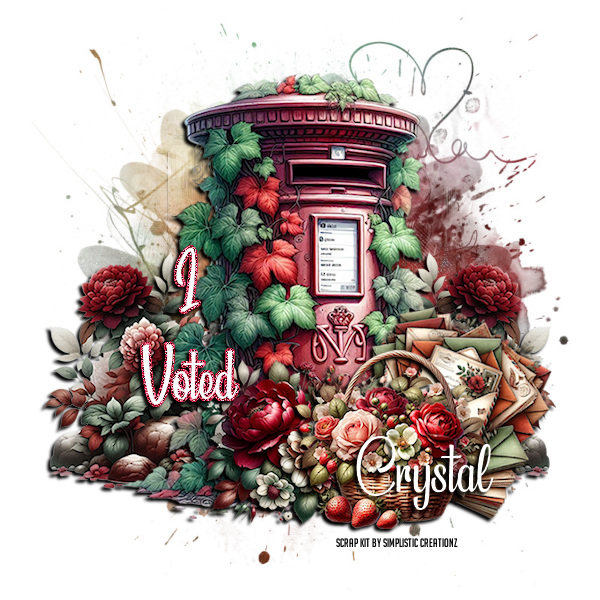
Caramel Dreams


This tutorial was written on January 22, 2026
I use PSP2023 but any version should work.

Supplies:
Scrap Kit by Simplistic Creationz 
Mask of Choice
Add your DS as you go to your liking

Step by Step:
*Open a 600x600 canvas
*Select All and C&P paper 8 into selection
*Apply mask of Choice and merge group
*Element 101, C&P element as a new layer, RS to your liking, Place to the left of the canvas, Duplicate and Mirror Horizontally
*Element 24, C&P element as a new layer, RS to your liking, Place in the center of the canvas
*Element 105, C&P element as a new layer, RS to your liking, Place to the right of the Mailbox, Image/Free Rotate to the right/ 22.5
*Element 52, C&P element as a new layer, RS to your liking, Place to the right of the Mailbox in front of the letters
*Element 75, C&P element as a new layer, RS to your liking, Place to the left behind the basket, Flip Horizontal so the large red peony is seen
*Add some wording… this is going to be a "I Voted" tag for me.
*Add Credits and your name and you have created a quick easy tag
Happy Tagging all!


No comments:

Post a Comment